Metal (Coated)
Python: "mtl_metal_coated"
This is a simplified standard material, suitable for coated or oily metals.

Common
Node alias
Python: "mtl_alias"
Human-readable node alias.
Alias color
Python: "mtl_alias_color"
Identificative node color.
UV mapping
Projection mode
Python: "mtl_uvmap_projection"
Defines the UVW mapping projection mode.
Override uvmap
Python: "mtl_uvmap_override"
Uses the inner material UVW mapping controls, overriding the uvmap modifier(s) of the host object, if any.
Triplanar blend
Python: "mtl_uvmap_triplanar_blend"
If the projection is triplanar, defines how much the three planar projections are blended onto each other.
Width
Python: "mtl_uvmap_real_size_x"
Real world size of the material along the X axis.
Height
Python: "mtl_uvmap_real_size_y"
Real world size of the material along the Y axis.
Depth
Python: "mtl_uvmap_real_size_z"
Real world size of the material along the Z axis.
Real size link
Python: "mtl_uvmap_real_size_link"
Links the three real world dimensions so they are edited together.
Width repeat
Python: "mtl_uvmap_real_size_repeat_x"
Repeats (i.e., tiles) the UVW mapping along the X axis the given number of times within the defined width.
Height repeat
Python: "mtl_uvmap_real_size_repeat_y"
Repeats (i.e., tiles) the UVW mapping along the Y axis the given number of times within the defined height.
Depth repeat
Python: "mtl_uvmap_real_size_repeat_z"
Repeats (i.e., tiles) the UVW mapping along the Z axis the given number of times within the defined depth.
Repeat link
Python: "mtl_uvmap_real_size_repeat_link"
Links the three real size repeat values so they are edited together.
Axis alignment
Python: "mtl_uvmap_axis_alignment"
Reorients the projection towards the selected axis.
Convert to uvmap modifier
Python: "mtl_uvmap_convert"
Creates a uvmap modifier node and transfers the material's UVW mapping attributes. The new uvmap node is applied to the host object.
Repeat X
Python: "mtl_uvmap_xform_repeat_x"
Repeats the projected UVW space along the X/U axis. Increasing this value increases repetition.
Repeat Y
Python: "mtl_uvmap_xform_repeat_y"
Repeats the projected UVW space along the Y/V axis. Increasing this value increases repetition.
Translate X
Python: "mtl_uvmap_xform_translate_x"
Offsets the projected UVW space along the X/U axis.
Translate Y
Python: "mtl_uvmap_xform_translate_y"
Offsets the projected UVW space along the Y/V axis.
Rotate
Python: "mtl_uvmap_xform_rotate_z"
Rotates the projected UVW space about the Z/W axis. Positive values rotate counter-clockwise.
Coating
Coating weight
Python: "mtl_standard_coating_weight"
Controls the weight of the coating component. The coating component sits on top of the rest of the material. Rays reflected at the coating do not get to hit the underlying material. A good example of coatings is varnish in wood.
Coating weight map
Python: "mtl_standard_coating_weight_map"
Controls the weight of the coating component using a grayscale map.
Coating roughness
Python: "mtl_standard_coating_roughness"
Controls the roughness of the coating.
Coating roughness map
Python: "mtl_standard_coating_roughness_map"
Controls the roughness of the coating using a texture map. White parts of the texture represent full roughness. Black parts of the texture represent mirror-like reflections.
Bump strength
Python: "mtl_standard_coating_bump_strength"
Determines how much of the substrate's bump mapping gets to affect the coating layer. For example, this can be used to make a layer of varnish dim the bumps at the underlying wood.
Bump strength map
Python: "mtl_standard_coating_bump_strength_map"
Controls the bump strength with a map.
Coating color
Python: "mtl_standard_coating_color"
Defines the reflection color of the coating.
Coating color map
Python: "mtl_standard_coating_color_map"
Defines the reflection color of the coating using a texture map.
Coating IOR
Python: "mtl_standard_coating_ior"
Controls the Index Of Refraction of the coating. High values cause more reflection and also occlude the material substrate accordingly. Excessively high values will make the reflection look metallic.
Coating tint thickness
Python: "mtl_standard_coating_tint_thickness"
Controls the thickness of the coating used to simulate internal absorption. Higher values will give a higher chance for light to get tinted by the coating.
Coating tint thickness map
Python: "mtl_standard_coating_tint_thickness_map"
Controls the thickness of the coating used to simulate internal absorption using a texture map.
Coating tint color
Python: "mtl_standard_coating_tint_color"
Controls the color of the internal coating tint. This simulates absorption within the extremely thin thickness of the coating.
Coating tint color map
Python: "mtl_standard_coating_tint_color_map"
Controls the color of the internal coating tint using a texture map.
Diffuse
Diffuse weight
Python: "mtl_standard_diffuse_weight"
Controls the weight of the diffuse component.
Diffuse weight map
Python: "mtl_standard_diffuse_weight_map"
Controls the weight of the diffuse component using a grayscale map where black represents 0 and white 1.0.
Diffuse color
Python: "mtl_standard_diffuse_color"
Controls the diffuse color.
Diffuse color map
Python: "mtl_standard_diffuse_color_map"
Controls the diffuse color using a texture map.
Specular
Specular roughness
Python: "mtl_standard_specular_roughness"
Controls the specular roughness amount.
Specular roughness map
Python: "mtl_standard_specular_roughness_map"
Controls the specular roughness amount with a texture map. White parts of the texture represent full roughness. Black parts of the texture represent mirror-like reflections.
Specular IOR
Python: "mtl_standard_specular_ior"
Controls the IOR of the specular component, which controls Fresnel reflection. High values will progressively increase the reflection strength. Too high values will start to occlude the underlying material components and look metallic.
Specular IOR file (.IOR)
Python: "mtl_standard_specular_ior_map"
IOR (or complex IOR) files represent lab-measured data for various type of materials. Maverick provides a collection of these in its maps library.
Specular anisotropy
Python: "mtl_standard_specular_anisotropy"
Controls the amount of specular anisotropy. Anisotropy is the stretching of reflections due to highly directional surface micro imperfections or grooves such as those seen in brushed metals. This value controls how much specular reflections will be stretched.
Specular anisotropy map
Python: "mtl_standard_specular_anisotropy_map"
Controls the amount of specular anisotropy using a texture map. White in the texture represents an anisotropy value of 1 (full). Black represents an anisotropy value of 0 (none).
Specular anisotropy rotation
Python: "mtl_standard_specular_rotation"
Controls the specular anisotropy stretch direction.
Specular anisotropy rotation map
Python: "mtl_standard_specular_rotation_map"
Controls the specular anisotropy stretch direction using a texture map.
Metalness
Python: "mtl_standard_metalness"
Controls the amount of metalness. Metalness uses the diffuse color or diffuse color map (if set) to produce the metal color.
Metalness map
Python: "mtl_standard_metalness_map"
Controls the amount of metalness using a texture map. White represents full metalness while black represents no metalness.
Bump (Normal/Height)
Enable bump mapping
Python: "mtl_normal_enable"
Enables bump mapping, which can be controlled with a normal map or a height map.
Strength
Python: "mtl_normal_strength"
Defines the bump strength. A value of 1 in a normal map renders the actual normals as they are represented in the texture. This is particularly relevant for maps that were baked in sculpting software. On the other hand, strength in grayscale height maps is somewhat resolution-dependent and must be adjusted manually.
Normal/Height map
Python: "mtl_normal_map"
Perturbs the surface normals with a bump (normal or height) map. Bump mapping is universally much cheaper than displacement mapping, and often looks as visually convincing. For extreme relief details, or close ups, displacement may be better suited.
Mode
Python: "mtl_normal_mode"
Establishes whether the texture must be interpreted as a height map (gray levels) or a normal map (rgb-encoded normals).
Height map epsilon
Python: "mtl_normal_epsilon"
When a procedural (non-filetex) height map is used, normals are computed on the fly by taking enough map samples to estimate the surface slope on the neighborhood of the pixel being shaded. Bump mapping crispness and proper capture of detail is very sensitive to this value.
Invert direction
Python: "mtl_normal_invert"
Flips inwards-and-outwards the resulting normals, which is equivalent to negating the strength value. In the case of a height map, this is also equivalent to inverting black-and-white in the input map.
Flip X
Python: "mtl_normal_flip_x"
Flips the X (U) direction of the input normal map.
Swap X/Y
Python: "mtl_normal_swap_xy"
Swaps the X/Y (U/V) directions of the input normal map.
Flip Y
Python: "mtl_normal_flip_y"
Flips the Y (V) direction of the input normal map.
Add round_edges
Python: "mtl_add_round_edges"
Adds a round_edges map to this material. If the material does not have a bump map yet, a round_edges map is trivially applied. If the material already has a bump map, then this button creates a bump_blend with a round_edges node plugged at its base.
Displacement (Micro-Patch)
Enable displacement
Python: "mtl_mpdm_enable"
Enables micro-polygon (micro-patch) displacement mapping (a.k.a., MPDM) in the object the material is applied to. Unlike brute-force subdiv+displacement, MPDM spawns micro-geometry on path-tracing time only, and hence is capable of delivering virtually unlimited amounts of detail with a negligible memory footprint.
Displacement height
Python: "mtl_mpdm_height"
Determines, in real world units, how high the spawned micro-geometry will be pushed away from the base mesh. This value acts as a multiplier for the height map.
Displacement height map
Python: "mtl_mpdm_height_map"
Sets the displacement height texture map. Every single texel in the height map will spawn a virtual micro-patch (a bilinear quad patch) in path-tracing time.
Midpoint
Python: "mtl_mpdm_midpoint"
Defines the displacement baseline. Setting this value to 0.5 will displace half the height inwards and half outwards. The right setting for this value depends on the DCC app used to produce the displacement map. e.g., 32-bit .exr maps exported from ZBrush expect a midpoint value of 0.0.
Waterlevel (lo)
Python: "mtl_mpdm_waterlevel_lo"
Defines a height map value below which displaced geometry is clipped out. The default value (0) clips no geometry at all.
Waterlevel (hi)
Python: "mtl_mpdm_waterlevel_hi"
Defines a height map value above which displaced geometry is clipped out. The default value (1) clips no geometry at all.
Opacity
Enable opacity
Python: "mtl_opacity_enable"
Enables opacity mapping in the geometry the material is applied to. Note that opacity mapping is computationally-intensive.
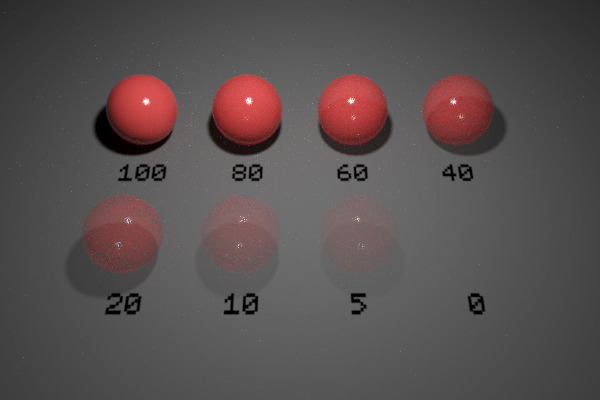
Opacity
Python: "mtl_opacity"
Defines the percentage of light rays that will be allowed to pass through the object not being affected by it in any way.
Opacity map
Python: "mtl_opacity_map"
Defines the opacity level of the object with a grayscale texture map. Opacity maps are interpreted so dark colors make the surface more translucent. I.e., black completely clips the geometry away, whereas white produces fully solid geometry. This map gets multiplied by the numerical opacity value.
Single-sided geometry
Python: "mtl_single_sided"
When enabled, object(s) this material is applied to will be visible from their front side, but invisible from their back side.
Trace sets
Include list
Python: "mtl_trace_set_include"
List of comma or space-separated trace set IDs. If the list starts by - then the list is inverted (i.e., all IDs except for the listed ones). Light paths bouncing at the material will interact with (at least) the objects or lights that belong to the listed trace sets. For example, you can use this list to re-include a trace set that was excluded at a previous GI bounce.
Enable include list
Python: "mtl_trace_set_include_enable"
Enables or disables the trace sets include list. If enabled, the list is appended to the include list at the object(s) the material is applied to.
Exclude list
Python: "mtl_trace_set_exclude"
List of comma or space-separated trace set IDs. If the list starts by - then the list is inverted (i.e., all IDs except for the listed ones). Light paths bouncing at the material will not interact with the objects or lights that belong to the listed trace sets. For example, you can use this to make an object exclude the shadows produced by other particular object.
Enable exclude list
Python: "mtl_trace_set_exclude_enable"
Enables or disables the trace sets exclude list. If enabled, the list is appended to the exclude list at the object(s) the material is applied to.
Affect diffuse
Python: "mtl_trace_set_affect_dif"
Makes the include/exclude lists be used for bounces at the diffuse component(s) of the material.
Affect specular
Python: "mtl_trace_set_affect_spc"
Makes the include/exclude lists be used for bounces at the reflective component(s) of the material.
Affect transmission
Python: "mtl_trace_set_affect_trm"
Makes the include/exclude lists be used for bounces at the refractive component(s) of the material.
Include IBL refl/refr overrides
Python: "mtl_include_ibl_overrides"
Flags the material in the trace sets system to include the IBL refl/refr overrides regardless of the constraints set in the IBL node.
Cull interior geometry
Python: "mtl_cull_interior"
When enabled, any geometry intersecting the object(s) this material is applied to will be removed. This is particularly useful to remove geometry that wrongly intersects other objects due to modeling inaccuracies. Metallic prongs intersecting gemstones in jewelry are a classic example.
Disable direct lighting
Python: "mtl_no_direct"
When enabled the material will not receive any direct lighting.
Disable indirect lighting
Python: "mtl_no_indirect"
When enabled the material will not receive any indirect lighting.
Compositing
Material ID color
Python: "mtl_mask_color"
Choose a custom color for the material ID AOV.
Enable material ID color
Python: "mtl_mask_color_enable"
Allows to choose a custom color for the material ID AOV. This color is used when the material AOV is set to custom color mode.
Render set ID
Python: "mtl_render_set_id"
Defines what render set objects using this material will be render in. The list of render sets to be rendered can be enabled and defined in the Render panel.