Switch
Python: "mtl_switch"
The mtl_switch node scatters up to 8 materials among the objects it is assigned to. For instance, you might use this node to randomize the color of leaves in a plant.

Common
Node alias
Python: "mtl_alias"
Human-readable node alias.
Alias color
Python: "mtl_alias_color"
Identificative node color.
Submaterials
Input
Python: "mtl_switch_input"
Determines what primvar the node uses to scatter materials.
Randomize
Python: "mtl_switch_randomize"
Random number seed used to scatter the list of materials.
Material 1
Python: "mtl_switch_input_1_mtl"
Defines the i-th material.
Enable material 1
Python: "mtl_switch_input_1_mtl_enable"
Enables or disables the i-th material. Only materials which are both plugged and enabled are scattered.
Material 2
Python: "mtl_switch_input_2_mtl"
Defines the i-th material.
Enable material 2
Python: "mtl_switch_input_2_mtl_enable"
Enables or disables the i-th material. Only materials which are both plugged and enabled are scattered.
Material 3
Python: "mtl_switch_input_3_mtl"
Defines the i-th material.
Enable material 3
Python: "mtl_switch_input_3_mtl_enable"
Enables or disables the i-th material. Only materials which are both plugged and enabled are scattered.
Material 4
Python: "mtl_switch_input_4_mtl"
Defines the i-th material.
Enable material 4
Python: "mtl_switch_input_4_mtl_enable"
Enables or disables the i-th material. Only materials which are both plugged and enabled are scattered.
Material 5
Python: "mtl_switch_input_5_mtl"
Defines the i-th material.
Enable material 5
Python: "mtl_switch_input_5_mtl_enable"
Enables or disables the i-th material. Only materials which are both plugged and enabled are scattered.
Material 6
Python: "mtl_switch_input_6_mtl"
Defines the i-th material.
Enable material 6
Python: "mtl_switch_input_6_mtl_enable"
Enables or disables the i-th material. Only materials which are both plugged and enabled are scattered.
Material 7
Python: "mtl_switch_input_7_mtl"
Defines the i-th material.
Enable material 7
Python: "mtl_switch_input_7_mtl_enable"
Enables or disables the i-th material. Only materials which are both plugged and enabled are scattered.
Material 8
Python: "mtl_switch_input_8_mtl"
Defines the i-th material.
Enable material 8
Python: "mtl_switch_input_8_mtl_enable"
Enables or disables the i-th material. Only materials which are both plugged and enabled are scattered.
Displacement (Micro-Patch)
Enable displacement
Python: "mtl_mpdm_enable"
Enables micro-polygon (micro-patch) displacement mapping (a.k.a., MPDM) in the object the material is applied to. Unlike brute-force subdiv+displacement, MPDM spawns micro-geometry on path-tracing time only, and hence is capable of delivering virtually unlimited amounts of detail with a negligible memory footprint.
Displacement height
Python: "mtl_mpdm_height"
Determines, in real world units, how high the spawned micro-geometry will be pushed away from the base mesh. This value acts as a multiplier for the height map.
Displacement height map
Python: "mtl_mpdm_height_map"
Sets the displacement height texture map. Every single texel in the height map will spawn a virtual micro-patch (a bilinear quad patch) in path-tracing time.
Midpoint
Python: "mtl_mpdm_midpoint"
Defines the displacement baseline. Setting this value to 0.5 will displace half the height inwards and half outwards. The right setting for this value depends on the DCC app used to produce the displacement map. e.g., 32-bit .exr maps exported from ZBrush expect a midpoint value of 0.0.
Waterlevel (lo)
Python: "mtl_mpdm_waterlevel_lo"
Defines a height map value below which displaced geometry is clipped out. The default value (0) clips no geometry at all.
Waterlevel (hi)
Python: "mtl_mpdm_waterlevel_hi"
Defines a height map value above which displaced geometry is clipped out. The default value (1) clips no geometry at all.
Opacity
Enable opacity
Python: "mtl_opacity_enable"
Enables opacity mapping in the geometry the material is applied to. Note that opacity mapping is computationally-intensive.
Opacity
Python: "mtl_opacity"
Defines the percentage of light rays that will be allowed to pass through the object not being affected by it in any way.
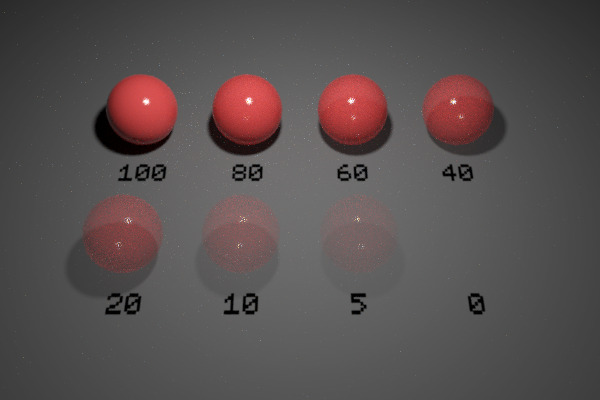
Opacity map
Python: "mtl_opacity_map"
Defines the opacity level of the object with a grayscale texture map. Opacity maps are interpreted so dark colors make the surface more translucent. I.e., black completely clips the geometry away, whereas white produces fully solid geometry. This map gets multiplied by the numerical opacity value.
Single-sided geometry
Python: "mtl_single_sided"
When enabled, object(s) this material is applied to will be visible from their front side, but invisible from their back side.