Blend
Python: "mtl_blend"
With the blend material one can create compound materials. Compound materials can be alloys, where each submaterial contributes a percentage to the total, or mask-based blends where one or more mask maps determine which parts of the object reveal which submaterial.

Common
Node alias
Python: "mtl_alias"
Human-readable node alias.
Alias color
Python: "mtl_alias_color"
Identificative node color.
UV mapping
Projection mode
Python: "mtl_uvmap_projection"
Defines the UVW mapping projection mode.
Override uvmap
Python: "mtl_uvmap_override"
Uses the inner material UVW mapping controls, overriding the uvmap modifier(s) of the host object, if any.
Triplanar blend
Python: "mtl_uvmap_triplanar_blend"
If the projection is triplanar, defines how much the three planar projections are blended onto each other.
Width
Python: "mtl_uvmap_real_size_x"
Real world size of the material along the X axis.
Height
Python: "mtl_uvmap_real_size_y"
Real world size of the material along the Y axis.
Depth
Python: "mtl_uvmap_real_size_z"
Real world size of the material along the Z axis.
Real size link
Python: "mtl_uvmap_real_size_link"
Links the three real world dimensions so they are edited together.
Width repeat
Python: "mtl_uvmap_real_size_repeat_x"
Repeats (i.e., tiles) the UVW mapping along the X axis the given number of times within the defined width.
Height repeat
Python: "mtl_uvmap_real_size_repeat_y"
Repeats (i.e., tiles) the UVW mapping along the Y axis the given number of times within the defined height.
Depth repeat
Python: "mtl_uvmap_real_size_repeat_z"
Repeats (i.e., tiles) the UVW mapping along the Z axis the given number of times within the defined depth.
Repeat link
Python: "mtl_uvmap_real_size_repeat_link"
Links the three real size repeat values so they are edited together.
Axis alignment
Python: "mtl_uvmap_axis_alignment"
Reorients the projection towards the selected axis.
Convert to uvmap modifier
Python: "mtl_uvmap_convert"
Creates a uvmap modifier node and transfers the material's UVW mapping attributes. The new uvmap node is applied to the host object.
Repeat X
Python: "mtl_uvmap_xform_repeat_x"
Repeats the projected UVW space along the X/U axis. Increasing this value increases repetition.
Repeat Y
Python: "mtl_uvmap_xform_repeat_y"
Repeats the projected UVW space along the Y/V axis. Increasing this value increases repetition.
Translate X
Python: "mtl_uvmap_xform_translate_x"
Offsets the projected UVW space along the X/U axis.
Translate Y
Python: "mtl_uvmap_xform_translate_y"
Offsets the projected UVW space along the Y/V axis.
Rotate
Python: "mtl_uvmap_xform_rotate_z"
Rotates the projected UVW space about the Z/W axis. Positive values rotate counter-clockwise.
Submaterials
Additive
Python: "mtl_blend_additive"
Changes the blending mode to Additive.
Material
Python: "mtl_blend_mtl_1"
Defines the base material. Blend materials can be nested to extend the maximum number of blended materials.
Material weight
Python: "mtl_blend_weight_1"
Blend amount for the base material.
Material weight map
Python: "mtl_blend_weight_1_map"
Grayscale texture map which luminance controls the blend amount for the base material.
Material
Python: "mtl_blend_mtl_2"
Defines the i-th material layer. Additional layers are stacked on top of the base material.
Material weight
Python: "mtl_blend_weight_2"
Blend amount for the i-th material layer.
Material weight map
Python: "mtl_blend_weight_2_map"
Grayscale texture map which luminance controls the blend amount for the i-th material layer.
Material
Python: "mtl_blend_mtl_3"
Defines the i-th material layer. Additional layers are stacked on top of the base material.
Material weight
Python: "mtl_blend_weight_3"
Blend amount for the i-th material layer.
Material weight map
Python: "mtl_blend_weight_3_map"
Grayscale texture map which luminance controls the blend amount for the i-th material layer.
Material
Python: "mtl_blend_mtl_4"
Defines the i-th material layer. Additional layers are stacked on top of the base material.
Material weight
Python: "mtl_blend_weight_4"
Blend amount for the i-th material layer.
Material weight map
Python: "mtl_blend_weight_4_map"
Grayscale texture map which luminance controls the blend amount for the i-th material layer.
Displacement (Micro-Patch)
Enable displacement
Python: "mtl_mpdm_enable"
Enables micro-polygon (micro-patch) displacement mapping (a.k.a., MPDM) in the object the material is applied to. Unlike brute-force subdiv+displacement, MPDM spawns micro-geometry on path-tracing time only, and hence is capable of delivering virtually unlimited amounts of detail with a negligible memory footprint.
Displacement height
Python: "mtl_mpdm_height"
Determines, in real world units, how high the spawned micro-geometry will be pushed away from the base mesh. This value acts as a multiplier for the height map.
Displacement height map
Python: "mtl_mpdm_height_map"
Sets the displacement height texture map. Every single texel in the height map will spawn a virtual micro-patch (a bilinear quad patch) in path-tracing time.
Midpoint
Python: "mtl_mpdm_midpoint"
Defines the displacement baseline. Setting this value to 0.5 will displace half the height inwards and half outwards. The right setting for this value depends on the DCC app used to produce the displacement map. e.g., 32-bit .exr maps exported from ZBrush expect a midpoint value of 0.0.
Waterlevel (lo)
Python: "mtl_mpdm_waterlevel_lo"
Defines a height map value below which displaced geometry is clipped out. The default value (0) clips no geometry at all.
Waterlevel (hi)
Python: "mtl_mpdm_waterlevel_hi"
Defines a height map value above which displaced geometry is clipped out. The default value (1) clips no geometry at all.
Opacity
Enable opacity
Python: "mtl_opacity_enable"
Enables opacity mapping in the geometry the material is applied to. Note that opacity mapping is computationally-intensive.
Opacity
Python: "mtl_opacity"
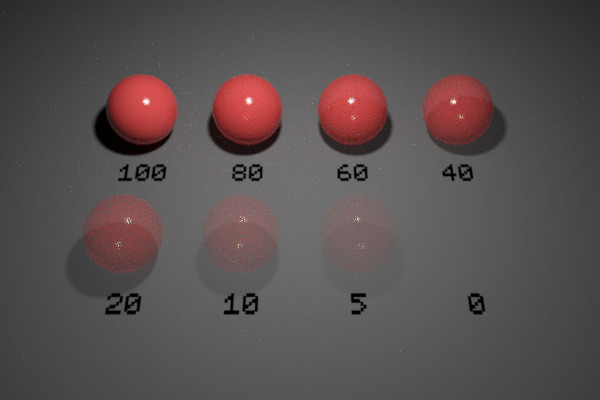
Defines the percentage of light rays that will be allowed to pass through the object not being affected by it in any way.
Opacity map
Python: "mtl_opacity_map"
Defines the opacity level of the object with a grayscale texture map. Opacity maps are interpreted so dark colors make the surface more translucent. I.e., black completely clips the geometry away, whereas white produces fully solid geometry. This map gets multiplied by the numerical opacity value.
Single-sided geometry
Python: "mtl_single_sided"
When enabled, object(s) this material is applied to will be visible from their front side, but invisible from their back side.